 A few days ago I got my invitation code to the SQL Data Services CTP and last week I decided to take a peek of the ‘new technology’. Since I could not find a straight forward example of what to do when you want to test the SQL Data Services (FKA: SQL Server Data Services), I decided to post here a short version of what I did and hopefully someone will find here what I found in many places.
So, first of all I assume you already signed up for a SDS account at Microsoft Connect. They’ll send you two emails. The first one tells you your code to sign in but it also says the service is not available yet. And then, you get another email saying that the service in now available for you and that you need to sign in with the code they’d sent in the previous mail. Why don’t they send you just one mail when everything is ready? beats me!
And then what? well, is not easy… as I mentioned before, the site sucks big time. You need to go to the Azure site and click on the Sign In button at the top right corner. You might think you we’ll be prompted for user credentials, but no. Just click on Microsoft .Net Services & Microsoft SQL Data Services (or click my link). Now here you’ll have to sign in. Type your invitation code, the one they sent you in the first mail, here and click on Sign Up. Then you need to create a solution (remember this solution name for further reference). They also assign you a password (which you can change).
After that, click on the SDK link and download the Microsoft SQL Services SDK. After installing the so called ‘SDK’' open the SSDS Explorer. Read the doc to create and Authority, Containers and Entities (ACE is a mnemonic you might want to remember). I suggest you play around for a while before trying to write some code. Create Containers, and Entities. Create entities whit a different name (other than Entity) and same thing for the entity properties… notice you can write what ever you want there. Try some LinQ to query your entities.
In order to keep the post short I’ll show you some code in my next post.
Edit: I forgot to mention that the credentials asked by the SSDS Explorer are the name of the solution (the one you created before), and the password they gave (which hopefully you changed it)
Read Full Post
Summary only...
I recently read an article on Visual Studio Magazine from Roger Jennings where he discussed performance using LinQ to SQL.
One of the key "benefits" of using LinQ to SQL with the Entity Framework is the lazy loading. Lazy loading implies that when you are querying Orders you'll get just the orders and in case you want to go thru the Order lines only then LinQ will execute the query against your DB to get the lines.
There are pros and cons against the "old" schema where you used a DataAdapter with the query to fill a DataSet.
One of the pros I see is that the query to get the orders will probably execute faster since it's only going to one table (or two if you want the customer name), thus you'll get to see the orders header faster. But, what happens when you want to see the order lines? well, you have again, to wait for the db to execute "your" query and send in the results. And what if you want to see the Customer address? again another query to the db which Roger refers as to round trips to the database.
In his article Roger discusses a few tips to tweak those round trips and get the best performance out of LinQ SQL, but there's a table in his article which I'm posting here, where you can see not only the time difference between every method of retrieving data, but also the amount of queries LinQ SQL fires to the database in order to get the data. Also, for comparison purposes, he shows typed DataSets which are the fastest and one with the least amount of queries of all.
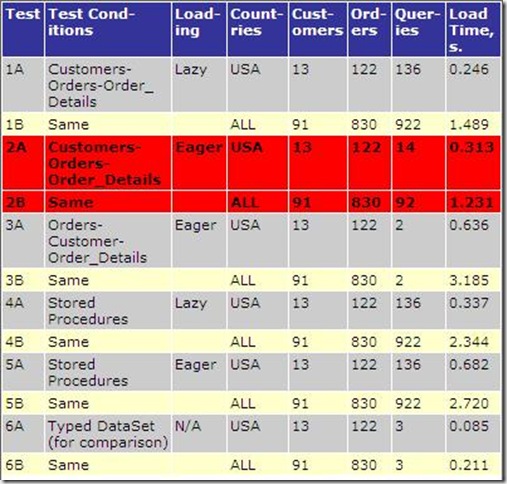
(The red rows were painted by Roger himself to show the best approach)
So... what to choose and when? The answer is simple... Get DeKlarit ;)
DeKlarit uses DataAdapters and DataSets so you don't have to write the SQL queries. Also, DeKlarit knows what you want to get in advance, how? because you told him so while defining the Date Providers.
So, as I see it, you have three ways of getting your data:
1) You use LinQ SQL with entity framework for compile time syntax checking and stuff and loose performance
2) Write your own queries to fill datastes taking care of the connection and everything else gaining performance but doing a lot of the hard work yourself, or
3) Get DeKlarit and just focus in the UI which as far as the client goes, that's what makes your app appealing
I thought it was going to be a tech post but it ended up in a marketing kind of way :)
Read Roger's full article here
Read Full Post
Summary only...
And it's not just me saying it!
The thing is, I have a database with many tables and I created in a new database the exact same tables (at least some of them). Then, for testing purposes, I wanted to populate these tables with the data from the previous database. In SQL2000 I did this hundreads of times with no problems but "now" they replaced DTS for SSIS, and it's just stupid what it is doing. Eventhough there's no identity fields in the tables I have to set "Enable identity insert" to true, otherwise the wizard will try to create the table and since they're already there the script fails saying it could not complete the create table statement :(
While searching for this issue I found quite a few, so I suggest if you're trying to transfer data, use the DTS Import/Export wizard from SQL2000. It just works!
(BTW: I have SQL2005 SP2)
Read Full Post
Summary only...


 Posts
Posts


