Showing posts with label GeneXus. Show all posts

Friday, March 18, 2016

The fish is out

nemonewThis is a project I’ve worked for several months now. It was internally called “project Nemo” (I like having internal project names) and it was about speeding up the process of generation.
In one of our regulars Development Team Meetings (DTM) somebody mentioned about an issue where generating Genexus’ Structured Data Types (SDTs) was taking too long, and how she was fighting that issue. That got me thinking that SDTs are “simple” classes definitions, I mean there’s no complex logic on finding related tables, closure, and stuff for what prolog is very good. So we started talking with Gastón about it and we thought it would be a good sample of simple template-based code generation. What does that mean? if you take a look at the generated code of an SDT it starts with a class definition, some initialization methods, property definitions, serialization methods (ToJson) and finally the rest interface with its properties. Every single SDT is generated with the same components.


So what is Nemo?

Nemo is a new generator for SDTs (for now) that uses StringTemplate technology for code generation. The generation has two parts, a “specificator” and the code generator itself.
The specificator “listens” to internal Genexus events like saving or deleting an object. If this object is an SDT, it specifies it. That specification is a serialization of every property of the SDT needed for later generation. That specification is saved as a json file which is then read by the generator, to generate (of course) the source for that SDT, it could be one or many source code files depending on the levels of an SDT.

WIIFY

So, “what’s in it for me?” you might say. Well, it depends on the size of your KnowledgeBase (KB) and the amount of SDTs in that KB, but we’ve seen generation times cut off by 30%, which we believe is pretty good for a start.

Roadmap

Right now, Nemo is turned on by default in Genexus Salto Beta 2, released last week (March 10th). Right now it’s only generating C#, Java is expected for the Beta 3 release. Also, there are other objects that can be generated by Nemo, like Domains, BusinessObjects (BCs) and that is also under the radar.
So give it a try, download the beta 2 of Genexus Salto and start taking advantage of the improvements.

Sunday, March 01, 2015

Building mobile apps for the modern enterprise or consumer

I recently came across an interesting “article” on building mobile apps, actually is more of a Visual Studio brochure. It had some interesting facts that easily explain why you should choose for either building native smart devices apps or go for a common features/language scenario where you get the apps fast in the market.

Interesting enough they even have a chart that shows the choices you have:

IC752185   

Let’s see what this chart tell us. On the far left you have great quality, high costs, great apps. I don’t want to start a fight over colors again, but I see that balloon in a redish/pink background. Then you have Xamarin, where you have a little less quality but gain a little in productivity. Then it goes down to Cordova, where you loose a lot of quality but gain a good chunk of productivity. And the lowest point in productivity comes mobile web, where you obviously gain productivity because you basically write one single HTML app and show it in every platform.

But the funny thing about the chart is that it has an “ideal spot” that reads “Great quality on all devices, agile development”.

Guess who’s in that spot? that’s right… I am, I work with a tool that generates great quality native apps in an agile and productive way. I bet you do too :)

IC752185_gx

What’s my point with this? I’m not trying to sell Genexus, I’m a terrible sales person, my point is that those of us who use Genexus are in the right path. Maybe some day there will be only one platform and it’ll be easier to start device development, but right now, where there are clearly 3 major players, having a tool that can help us with cross-platform development is a must, and of course, we want the best experience in each platform.

On a side note, keep in mind I’m not even talking about model driven development, which for me is must. I had a teacher at the university that more than 10 years ago said to us, “if you start a new project writing public class you’re obviously doing something wrong”.

Those of us who use a tool for cross-platform agile development have clearly and advantage over the rest, either by app quality or time to market, and when I say time to market I mean time to the 3 major markets. So start your great ideas today.
(great ideas not included)

Source to the original article and chart: http://www.visualstudio.com/explore/modern-mobile-apps-vs

Tuesday, October 30, 2012

The Windows Store apps ecosystem

It’s been pretty exciting lately with all the announcements from Microsoft. Windows 8 finally came out, we saw the Surface tablet and other some really cool devices, and today Windows Phone 8 was announced to hit the stores in a few days.

I’ve been using Windows 8 since the developer preview and of course it takes some time to get used to it, but if you think about it, and you actually DON’T think too hard about it, Windows 7 keyboard shortcuts work as expected on Windows 8. So if you’re a keyboard wiz, you will have no trouble to find your way around.

What I like about all this new wave is the concept of one app in many devices. I don’t have an Xbox (yet) but being able to take a photo with my phone and have sent over my my notebook, tablet or favorite social network, is (for me) a big step forward. I know people with iPhone and Android devices will say “hey, I can do that with my phone already”, I know. I know it’s not rocket science, I’m just saying it’s a time saver to have it now with Windows, the OS my whole family uses… so now my mom won’t be calling me to help her hook the camera with the computer (that’s not a good example since she’s got an iPad, but you get the idea).

What I don’t like for what I’ve seen so far? The Windows Store. I guess Microsoft didn’t think it would grow-up so fast… the Windows Store as we know will NOT scale up. It’s already difficult to find an app. I don’t know what others have done, but it’s almost impossible to find a game I would like with such an awful layout. At this moment the games category has 1033 apps (games) laid out awfully, so unless you’re looking for Angry Birds or Cut the Rope, it’s frustrating to go in there in pursuit of a cool game. I’ve shut the window store app many times without a single download.

Another weird thing is how many apps have the default Visual Studio 2012 templates images. Either from previous preview versions as for the official released version, I’m talking about the little cross in a box or the star. What’s up with that? Why is Microsoft allowing those crappy looking apps into the store?… there’s no way in hell I’ll even pay attention to an app that’s was not paid attention in the first place from its own developers. That not only increases the amount of apps, which in this case is not good, but it also gives the impression of “beta”… and I’m not talking about the apps, I’m talking about the store.

I know what’s going on. There are a bunch of Microsoft developers who saw how others got rich with apps for iOS and/or Android. Nobody thought that could be possible. Even so, five years ago there were 0 (zero) iOS developers, today they say there more than a quarter million. While those “developers” made millions of apps, some Microsoft developers waited for Microsoft to come up with something, and now it did. And I bet those developers thought, “ok, now is my turn. I know this shit, I’ll get a Windows Store app in no time”. Well my friend, you don’t know shit about Windows Store apps. Actually nobody knows, we’re all learning about it, and if you take a look at the official Microsoft made apps, you’ll see they are also learning. So don’t give me that “I know Silverlight and Xaml, I know what I’m doing” cause your app will look like crap if you don’t sit down and read the tons of guidelines out there about Windows Store apps.

I’ve heard a lot lately that the Surface is great; great hardware but no good apps. I can’t believe there’s no facebook app, aren’t you guys friends anymore? and no official twitter app either? I just hope it’s not attempt from Microsoft to “make us” use IE10 instead, like they’re doing with Xbox.

The good news is, we’re making a Windows Store apps generator. I wrote before about it and showed some of the cool features you can take advantage of with our generator. You might be wondering what kind of apps can we build with this generator. Is it final consumer apps or is it enterprise level apps? Yes to both o them. There’s a big showcase of apps we have built with Genexus for iOS and Android, so expect the same apps for Windows 8 soon.

So, is there an app that you wish Windows 8 had but it is not there? Don’t wait for someone else to build something close to what you need. Download Genexus Tilo now, and start creating the next Windows 8 killer app.

Tuesday, October 02, 2012

Building a code generator, and running a marathon

485778_4347864811580_1796142993_nMany have been told about how writing code resembles to exhaust training. The long hours, the dedication, the exclusion of what others think of fun, and specially how others can’t understand what you do or why you do it. (assuming you also code for fun)

In the latest months I’ve been doing both of them, training for a marathon and writing the Genexus “Tilo” Windows 8 generator… but unlike the Win8 generator, I can say I finished the marathon (in one piece).

Of course I can’t say the generator is finished, the guys from Android and iOS have been working on them for over a year now so there’s a ton of work to be done. But just like while running the marathon(*), I’m not going to think about what’s missing but what we have achieved instead.

In Genexus we care about letting you model your solution, your needs, and don’t worry about what platform you’re targeting. We call it “platform-independent” or “platform-agnostic” but what I think is most important is our “non platform-ignorant” philosophy. And what does that mean for our Win8 generator? That you as a customer will want your app to use all the “cool features”  Windows 8 has as you would if you develop the app from scratch (meaning writing all the code yourself). So the cool thing is we already wrote all that code so it’s dead simple for you to use. Here I’ll show you what we have and what you need to do in order to have it running on your next Genexus Win8 app.

Lives Tiles

tiles

Lives Tiles is probably the first feature that will call your attention. This feature allows the “icon” (tile) of you app to show different info about your app. A news app for instances shows the latest news, a weather app shows the current conditions and so forth.

With Genexus all you need is a DataProvider that exposes the data you want to show in your tiles. That DataProvider must populate a known structure (SDT) so the app “knows” what to use for the image and what to use for the description. You have to keep in mind that only the latest 5 tiles will be displayed so you might want to limit that on the server side, on the dataprovider itself.

Genexus will provide the SDT (called ‘TileSDT’) and an example of the DataProvider, so all you need to do is modify the DataProvider to populate the SDT as you wish. Remember the [Count = 5] so you don’t send unused data to your app.

Full Device Integration

This was something simple to implement but it is very useful for apps. If you declare an attribute as an Image and you want your users to edit it they will want to use all the features they already have on the device. So that picture could be a file from the local hard drive, or a photo taken with the device’s camera or use any of the images that image providers apps provide. For instance, Windows 8 comes with a Photos apps that connects with your facebook account, flickr, skydrive and other computers, so you can choose an image from your facebook wall album to upload into your app. Cool uh? 

This comes “out of the box”.

Semantic Zoom

SemanticZoom

Semantic zoom lets you see a grid with a bigger picture view. So let’s say you’re showing contacts in your app and you have a grid where every item is of course a contact. You might want to reach to someone you know his name starts with an ‘S’ (like me). So you can scroll all the way to the S and then try to find me, or you can ‘pinch’ the grid and you will see a different view of the same grid, now grouped by the first name letter, doing it easier to go straight to the ‘S’ letter.

With Genexus you already have the “break by” feature of a grid, and you can now define different layouts for the same grid. So with that info you can have semantic zoom in your app.

Heterogeneous layouts

You probably had seen this but didn’t know the name of it. Heterogeneous layouts is the feature that allows you to see specific items of a grid with a different layout.

In Genexus you can define different layouts for your grids and pick on runtime the one you one for a specific pattern. Let’s say you want the item of the grid to be a big 2x2 square, or you want every 5 item to show one as a 2x1 ‘column’. Trust me, it sounds hardar than it is.

Search Charm

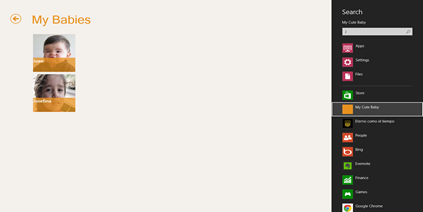
Charms is another cool feature of Windows 8. With the search charm you can search your apps, files, settings or in the context of an app. So you can search for ‘Angry Birds’ in the context of the Windows Store (which is an app) of course.

Windows 8 Genexus generated apps comply the search contract so once you call it swiping your finger from the right, your app will be there as a search provider.
Search

In Genexus, select the object where you want to display your results by setting the property “Search Result Object”. This object must have a grid with an attribute set as ‘Search’. That attribute will be the one your app will query for.

Share Charm

The share charm allows you share something from you app with someone else. Depending on the sharing apps you have, and the content you’re trying to share, some apps will appear as sharing target. Some of those apps will allow you to twit, send over email, send to skydrive, or maybe publish to your facebook wall.

Share is not an app wide feature, meaning that you must choose for every panel, that suits sharing of course, the attribute/variable you want to share.

Panels in Genexus have now a Share property where you can set the Attribute or Variable you want to share. Another way of sharing is by calling the Interop.SendMessage function.

Everything else

Of course there are tons of features that work as you would expect. Keep in mind we’re not even in beta yet but if you put a Date attribute the Date picker will be display, or an Enum domain will show you a combo or even the dynamic combos (Country – City) work as expected.

As mentioned before, there are some missing features… maps, notifications, audio, and more.

That’s a wrap!

So as you can see, there are quite a few cool Windows 8 features that your Genexus app can take advantage of. I encourage you to join the Genexus betatester program that will be available in a few weeks, download the Genexus Tilo night builds and give this generator a try. Right now there’s a alpha test program (at www.genexus.com/tilo) that you could apply if you have a project for Windows 8 (right now), if you just want to play around with it you’ll have to wait.

Also, just in case you just arrived earth from outer space, there’s this big (22nd) Genexus International Meeting in Montevideo from Oct 1 to Oct 3. There are a few sessions you might be interested in (if you found this post interesting), but there are tons of sessions, keynotes, labs and activities you’ll find amusing and educational. I’ll be there so come down and say hello and I’ll be happy to show you all this features live! It’s easy to locate me, I’ll be the guy in the suit.

works-on-my-machine] 

As I always say, this is “works on my machine” certified, but this time it’ll be soon ready for your machine :) stay tuned!

* When I reached the km 33 I hit “The Wall”… from that point on it was all will. I knew I had 9 km ahead of me, and by that time that seemed a lot, by I had already ran 33km, so giving up was not in my plans.

Tuesday, June 19, 2012

The @FindMyPlane bot

A few days ago I wrote about the Genexus Challenge developer edition and my first Smart Devices app, Find my Plane. Once I get, what I think is, a good idea in my head I get around it a lot to improve it in every possible way. But this is not the case, sort of.

Right after I deployed the app to the Apple’s app store, I thought “how can I advertise it, without paying for advertising of course”, I needed people to find out about the app and download it, and a good word about it would be awesome too. So I thought about social networks… Facebook is for friends and I already told them to download it (did I mentioned it’s free?!) so twitter came to mind… but what can I do to promote my app from twitter, other than twitting about it of course.

So I thought of the @FindmyPlane bot and this post will tell you how I did it, not that it’s rocket science, but I found an interesting use of Windows Azure’s Worker Roles*. Wait, what?! you’re gonna tell people how to build a twitter spammer bot? No, let me get into that.

The @FindMyPlane twitter account works like this. You send a twit to @FindMyPlane with your flight number and find my plane will answer that tweet with useful info about it, the same kind of info you’d get in the Find My Plane app, but of course, only the info that fits in 140 characters.

So this is how it works. There’s a worker role (called Receiver) that every ten seconds access the twitter api looking for mentions for the @FindMyPlane account. Once it gets the list of tweets (if any of course) it saves them to a Table from Azure Storage and saves the latest tweet id in a Queue (also from Azure Storage) so the next time it just asks from that tweet on.

This is pretty much the code:

string lastTweet = "";
string previousMessageId = "";
foreach (CloudQueueMessage message in Queue.GetAllMessages(Constants.AZURE_STORAGE_ACCOUNT, Constants.AZURE_STORAGE_KEY, Constants.AZURE_QUEUE))
{
previousMessageId = message.Id;
lastTweet = message.AsString;
}

bool first = true;
foreach (Status status in Mentions.GetMentions(fmp, lastTweet))
{
try
{
Table.Insert(Constants.AZURE_STORAGE_ACCOUNT, Constants.AZURE_STORAGE_KEY, Constants.AZURE_TABLE, TweetEntity.FromStatus(status).ToString());
}
catch { }

if (first)
{
lastTweet = status.Id;
first = false;
}
}

if (!first)
{
Queue.DeleteMessage(Constants.AZURE_STORAGE_ACCOUNT, Constants.AZURE_STORAGE_KEY, Constants.AZURE_QUEUE, previousMessageId);
Queue.CreateMessage(Constants.AZURE_STORAGE_ACCOUNT, Constants.AZURE_STORAGE_KEY, Constants.AZURE_QUEUE, lastTweet);
}


And there’s a second Worker Role (called Replier) that every ten seconds queries the table where the tweets were saved for those that have not been replied yet and don’t have errors. For every tweet I try to get info of the flight number sent, if I do find info, I reply the tweet with that info and update the record on the table as replied. If I can’t find info, let’s say you tweeted “@FindMyPlane is awesome!” I update the record as ‘with errors’. This is just a way for me to know when I couldn’t reply because of an error on the system or because what I got was not a valid flight number.


Code here:


string query = "Replied eq 'False' and Error eq 'False'";
foreach (TableEntity entity in Table.Query(Constants.AZURE_STORAGE_ACCOUNT, Constants.AZURE_STORAGE_KEY, Constants.AZURE_TABLE, query))
{
string flightNumber = entity["Text"].ToUpper().Replace("@FINDMYPLANE ", "");
try
{
FlightInfo info = FlightStatus.GetFlightStatus(flightNumber);
string tweet = string.Format("@{0} {1}", entity["UserScreenname"], info);
Update.UpdateStatus(tweet, fmp, entity["Id"]);
entity["Replied"] = "True";

Table.UpdateEntity(Constants.AZURE_STORAGE_ACCOUNT, Constants.AZURE_STORAGE_KEY, Constants.AZURE_TABLE, entity);
}
catch
{
try
{
entity["Error"] = "True";
Table.UpdateEntity(Constants.AZURE_STORAGE_ACCOUNT, Constants.AZURE_STORAGE_KEY, Constants.AZURE_TABLE, entity);
}
catch
{
Table.DeleteEntity(Constants.AZURE_STORAGE_ACCOUNT, Constants.AZURE_STORAGE_KEY, Constants.AZURE_TABLE, entity.PartitionKey, entity.RowKey);
}
}
}


Cool uh?!


Here’s how all this works together


image


(*) for a good read on the Azure platform, Worker Roles and Storage (Table, Queues & Blobs) go to: http://bit.ly/SGAzure


You can download the ‘Find my Plane’ for Android and for iPhone.

Saturday, June 09, 2012

Find my Plane

At Genexus we had a little contest. We had a few contest before where we asked customers and friends to create a cool app for Smart Devices with our brand new Smart Devices generator. Of course we could not participate, it would be unfair… (or at least that’s what they thought).

So a month ago, Gastón told us we would have an internal contest, it was called “GX Challenge (Developer Edition)” in which whoever wanted to participate had to build an app. Who wins? whoever gets the most downloads per app.

The most difficult thing is of course to come up with a good/cool idea, and I’m not saying that I finally came to a real good idea, with it was something that I’d definitely enjoy doing. So that’s how Find my Plane appeared.

Find my Plane is a simple app where you enter a flight number and the app would give you info about the flight. From where to where, terminal and gate (where available) and if the flight is on time or delayed, and even as Nicolás found out, if the plane was diverted to a different location.

But it was still too simple. Who would download an app like that if you can get that info and more from other apps? So I added a few things. First, thanks to wunderground.com API I added the weather of both departure and arrival airports of the flight, plus another small feature that is being able to listen to the air traffic controllers available from the mentioned airports. You can get all that from different apps, but I haven’t seen one with all those features combined so I thought it would be a cool app, and fun to develop.

It’s been on the Android Marketplace (AKA Google Play) for over 2 weeks now with a little over 100 downloads plus 200+ downloads from the Apple Marketplace in less than a week.

Here’s a little video of what the app looks like (on the Android emulator)


Like what you see? Download it now!

http://bit.ly/FMPAndroid

http://bit.ly/FMPiOS

p.s: Did I mention it is FREE!

Monday, March 12, 2012

Colored log4net log files in Notepad++

Some time ago, I can’t tell exactly when, I discovered Notepad++ (NPP). NPP is a great light weight text editor with tons of cool features.
I’m also a big fun of log4Net since I discovered when I added the logging features to Genexus and GXserver. It is so easy to implement and helpful that I have used it in every project I worked ever since.
So in my daily basis I get to work with log4net log files a lot. I was doing so last Saturday when it hit me, “I need syntax coloring for this”.
So I looked up and found a great post from Jon Galloway that explains how you can create your own “User Defined Language” in NPP. To my surprise it was pretty simple since NPP has a dialog to do so, I thought I’d have to some xml editing. The dialog does that for you and what’s even better you can see the results of what you’re changing while you’re doing it. 
notepadlog4net
The result is (to me) pretty cool. It’s now a lot easier to find the ERROR or WARN lines.
I also added a couple of features that basically are a better way to focus on what’s important.
Numbers are in yellow, single quoted strings are in red, each keyword (INFO, DEBUG, ERROR, WARN, FATAL) has its own color, plus I also added “comments”. By using the good old // to comment a line or /* to comment a block */, you can help you and others to pay attention to what really matters, or at least what you think matters.
So, how do you get this?
Simple way: If you have never defined of modified a User defined Language, you can simply download the posted file and override your existent in %APPDATA%\Notepad++ (Make sure you backup your file first)
“Harder” way: if you have modified of added a user defined language, you probably know what to do but anyways, download the file (same from above) open it in your favorite text editor ;) and copy the UserLang tag with its content and copy it to your current userDefineLang.xml file.

**We moved to GitHub! Download the file from: https://github.com/sebagomez/log4net-for-notepadpp

As usual, this is 100% “works on my machine” certified.works-on-my-machine]

Monday, October 24, 2011

Featuring GXpowerCommands

apgetwikiimageAfter @gmilano’s Cool Commands for Visual Studio I thought I should write my own “cool commands” for Genexus. There a few tasks the I need to do quite often and I thought I’d be great if I could have right there on a contextual menu, like completely deleting a folder and it’s content or “Rebuild and run” an object… or even run (execute) an object as is, no further specification of analysis needed.

So I created this package with the extensions I found useful to myself. Here’s a little description of every command:

Empty and delete folder: I tries to delete every object in a folder and the folder itself. The success will depend on the references the contained objects have to. I any object A outside the selected folder) is referencing an object B from the folder, B won’t be able to be deleted, thus, the folder either. This command is not transactional.
Build/Rebuild folder objects: Ever wanted to build every object in a folder? It’s kind of painful to select every single object, right? Now you can step on a folder and choose to build or rebuild every single object in it.
Rebuild and run: Only valid for main objects, this command will execute a forced build (rebuild) and then execute (run) the generated program.
Run as is: What was that message again? I know the state of the generated program, I just want to execute it, no validation needed. This is the command that will fire the browser and show you the program “as is”. 
Command prompt here: This is a command that’s now built-in in Visual Studio. Applied to Genexus you can open a command prompt at the Knowledge Base directory or at your different environments directories. Just click on the desired node from the Preferences tree and voilá.
Windows Explorer here: Same as command prompt but for Windows Explorer. Enough said.

This package can be freely downloaded from the Genexus Marketplace, so go ahead and give it a try.

In this post I’ll like to answer the question I know some people must be wondering: “dude! you work at the Genexus Development Team, why aren’t these commands available in Genexus out of the box?”. Well, I’m no traditional Genexus developer so I’m not sure if these commands will actually be useful to the entire community so I don’t want to add “noise” to the already pretty big menus we have in Genexus. So depending on the adoption of these commands you might see some of them in Genexus in the near future.

Spanish instructions here, download here.

Like every other set of bits from this blog, this extension is “Works on my machine” certified, but this one has actually been tested by the guys at the Genexus marketplace Smile
works-on-my-machine-starburst_3_thumb[1]

EDIT 25-Oct-2011: Genexus X Evolution 2 support is now available.

Thursday, November 26, 2009

Mi first useful Azure application

Azure I’ve been plying around with Windows Azure for over a year now, I started with the CTP Microsoft showed at PDC 2008 and played with SQL Azure (FKA: SDS) and Windows Azure ever since.
But today I uploaded my first useful application. I’m currently working the on Genexus deployment project which includes being able to deploy Genexus-generated applications to every supported platform (including of course Windows Azure). More on that in a future post.
So, to deploy an application to Windows Azure programmatically, you have to tell Azure where your package is (by its url) so the best choice is to upload you package to the you Azure storage account. But the storage does not have a nice UI, so I thought first on creating an application to actually see what’s in my storage account and then decided to make it a web application, and allow other to use it.
I know, it does not have a great user interface. I’m not good at it, and I didn’t care for it at all for this version. But I’ll promise I’ll add some functionality and improve the user experience.
If you want to check it out go to http://storageexplorer.cloudapp.net http://azurestorage.azurewebsites.net enter your account name and your access key and see what’s in your storage account. (Read only, for now!)
So I’m happy to announce that this application not only “Works on my Machine” but it also does on the Windows Azure platform :)
WorksOnAzure
Edit: now with improved UI :)

Tuesday, October 27, 2009

Internal Error 500 returned by IIS7 hosted WCF services

500 Here's an issue I had for quite a long time.
For some (unknown at the time) reason the server was returning a "500 - Internal Server error" whenever an exception was thrown.
Even the message on the exception was an html document (pasted below), so who was modifying my exceptions? it turned out to be the IIS itself due to some configuration settings.
There's a "feature" which avoids the IIS to send the real exception to the client sending instead a more "friendly" one.
So, how do you change that? (keep in mind this is IIS 7.0 and above)
Take a look at this great post (where I got the solution from) and follow step 2) of "Enable IIS7 detailed errors".

<!DOCTYPE html PUBLIC "-//W3C//DTD XHTML 1.0 Strict//EN" "http://www.w3.org/TR/xhtml1/DTD/xhtml1-strict.dtd">
<
html xmlns="http://www.w3.org/1999/xhtml">
<
head>
<
meta http-equiv="Content-Type" content="text/html; charset=iso-8859-1"/>
<
title>500 - Internal server error.</title>
<
style type="text/css">
<!--
body
{margin:0;font-size:.7em;font-family:Verdana, Arial, Helvetica, sans-serif;background:#EEEEEE;}
fieldset{padding:0 15px 10px 15px;}
h1{font-size:2.4em;margin:0;color:#FFF;}
h2{font-size:1.7em;margin:0;color:#CC0000;}
h3{font-size:1.2em;margin:10px 0 0 0;color:#000000;}
#header{width:96%;margin:0 0 0 0;padding:6px 2% 6px 2%;font-family:"trebuchet MS", Verdana, sans-serif;color:#FFF;
background-color:#555555;}
#content{margin:0 0 0 2%;position:relative;}
.content-container{background:#FFF;width:96%;margin-top:8px;padding:10px;position:relative;}
-->
</style>
</
head>
<
body>
<
div id="header"><h1>Server Error</h1></div>
<
div id="content">
<
div class="content-container"><fieldset>
<
h2>500 - Internal server error.</h2>
<
h3>There is a problem with the resource you are looking for, and it cannot be displayed.</h3>
</
fieldset></div>
</
div>
</
body>
</
html>

Thursday, September 24, 2009

Great simple explanation on Windows Azure

During the last GeneXus International Meeting held in Montevideo, I had the chance to talk for a few minutes with Steve Marx from the Windows Azure team. Milano and I were telling him what we expect to do with GeneXus and the Windows Azure platform.

The first scenario is having a one-click deployment to the cloud (Windows Azure platform) of the GeneXus generated applications. Since the SQL Azure is now a relational database (good old SQL Server) our reorganization programs can generate the tables in the cloud. Also, our applications are 100% compatible with the Azure environment so you could upload you application to the Azure platform today.

The other scenario is running GeneXus Server from the Azure platform. In this scenario we still have a “little” work to do. So we were asking Steve about the worker roles since we want to be able to specify and generate in the Azure platform and I have doubts about what could actually run in this “cloud”, so Steve explained it to me in a great simple way. He said, imagine I have a Windows Server 2008 installed out of the box with the .net framework 3.5 and all the latest service packs. Everything you could put on a portable USB drive and run from there will run on the Azure platform. He added, everything that needs a setup wizard, writing on the registry, and stuff won’t work.

As I said, great yet simple explanation of what you could run on the Azure platform.

Wednesday, September 02, 2009

Genexus X Evolution 1 Released!

GxXEv1

Genexus X Evolution 1 was finally released today at 12:55 (GMT-3). It is a great version with tons of new features and a great stability (check out the release notes here).

To me it’s a big deal since I was really involved in the new Team Development features and the communication with Genexus Server. BTW, GeneXus Server is now on RTM and will be released on the XIX Genexus International Meeting.

Hope to see everybody there.

Next stop, Cardal…

Thursday, May 01, 2008

GeneXus X is here

Many cool stuff I won't detail since you can read them from the site www.genexusX.com.

For a couple of months or so I contributed with my grain of sand to the GeneXus dev team, so I guess that allows me to feel the pride and happiness I feel right now about the release :)

Congratulations to all the team!