Showing posts with label programming. Show all posts

Sunday, March 01, 2015

Building mobile apps for the modern enterprise or consumer

I recently came across an interesting “article” on building mobile apps, actually is more of a Visual Studio brochure. It had some interesting facts that easily explain why you should choose for either building native smart devices apps or go for a common features/language scenario where you get the apps fast in the market.

Interesting enough they even have a chart that shows the choices you have:

IC752185   

Let’s see what this chart tell us. On the far left you have great quality, high costs, great apps. I don’t want to start a fight over colors again, but I see that balloon in a redish/pink background. Then you have Xamarin, where you have a little less quality but gain a little in productivity. Then it goes down to Cordova, where you loose a lot of quality but gain a good chunk of productivity. And the lowest point in productivity comes mobile web, where you obviously gain productivity because you basically write one single HTML app and show it in every platform.

But the funny thing about the chart is that it has an “ideal spot” that reads “Great quality on all devices, agile development”.

Guess who’s in that spot? that’s right… I am, I work with a tool that generates great quality native apps in an agile and productive way. I bet you do too :)

IC752185_gx

What’s my point with this? I’m not trying to sell Genexus, I’m a terrible sales person, my point is that those of us who use Genexus are in the right path. Maybe some day there will be only one platform and it’ll be easier to start device development, but right now, where there are clearly 3 major players, having a tool that can help us with cross-platform development is a must, and of course, we want the best experience in each platform.

On a side note, keep in mind I’m not even talking about model driven development, which for me is must. I had a teacher at the university that more than 10 years ago said to us, “if you start a new project writing public class you’re obviously doing something wrong”.

Those of us who use a tool for cross-platform agile development have clearly and advantage over the rest, either by app quality or time to market, and when I say time to market I mean time to the 3 major markets. So start your great ideas today.
(great ideas not included)

Source to the original article and chart: http://www.visualstudio.com/explore/modern-mobile-apps-vs

Read Full Post

Tuesday, October 30, 2012

The Windows Store apps ecosystem

It’s been pretty exciting lately with all the announcements from Microsoft. Windows 8 finally came out, we saw the Surface tablet and other some really cool devices, and today Windows Phone 8 was announced to hit the stores in a few days.

I’ve been using Windows 8 since the developer preview and of course it takes some time to get used to it, but if you think about it, and you actually DON’T think too hard about it, Windows 7 keyboard shortcuts work as expected on Windows 8. So if you’re a keyboard wiz, you will have no trouble to find your way around.

What I like about all this new wave is the concept of one app in many devices. I don’t have an Xbox (yet) but being able to take a photo with my phone and have sent over my my notebook, tablet or favorite social network, is (for me) a big step forward. I know people with iPhone and Android devices will say “hey, I can do that with my phone already”, I know. I know it’s not rocket science, I’m just saying it’s a time saver to have it now with Windows, the OS my whole family uses… so now my mom won’t be calling me to help her hook the camera with the computer (that’s not a good example since she’s got an iPad, but you get the idea).

What I don’t like for what I’ve seen so far? The Windows Store. I guess Microsoft didn’t think it would grow-up so fast… the Windows Store as we know will NOT scale up. It’s already difficult to find an app. I don’t know what others have done, but it’s almost impossible to find a game I would like with such an awful layout. At this moment the games category has 1033 apps (games) laid out awfully, so unless you’re looking for Angry Birds or Cut the Rope, it’s frustrating to go in there in pursuit of a cool game. I’ve shut the window store app many times without a single download.

Another weird thing is how many apps have the default Visual Studio 2012 templates images. Either from previous preview versions as for the official released version, I’m talking about the little cross in a box or the star. What’s up with that? Why is Microsoft allowing those crappy looking apps into the store?… there’s no way in hell I’ll even pay attention to an app that’s was not paid attention in the first place from its own developers. That not only increases the amount of apps, which in this case is not good, but it also gives the impression of “beta”… and I’m not talking about the apps, I’m talking about the store.

I know what’s going on. There are a bunch of Microsoft developers who saw how others got rich with apps for iOS and/or Android. Nobody thought that could be possible. Even so, five years ago there were 0 (zero) iOS developers, today they say there more than a quarter million. While those “developers” made millions of apps, some Microsoft developers waited for Microsoft to come up with something, and now it did. And I bet those developers thought, “ok, now is my turn. I know this shit, I’ll get a Windows Store app in no time”. Well my friend, you don’t know shit about Windows Store apps. Actually nobody knows, we’re all learning about it, and if you take a look at the official Microsoft made apps, you’ll see they are also learning. So don’t give me that “I know Silverlight and Xaml, I know what I’m doing” cause your app will look like crap if you don’t sit down and read the tons of guidelines out there about Windows Store apps.

I’ve heard a lot lately that the Surface is great; great hardware but no good apps. I can’t believe there’s no facebook app, aren’t you guys friends anymore? and no official twitter app either? I just hope it’s not attempt from Microsoft to “make us” use IE10 instead, like they’re doing with Xbox.

The good news is, we’re making a Windows Store apps generator. I wrote before about it and showed some of the cool features you can take advantage of with our generator. You might be wondering what kind of apps can we build with this generator. Is it final consumer apps or is it enterprise level apps? Yes to both o them. There’s a big showcase of apps we have built with Genexus for iOS and Android, so expect the same apps for Windows 8 soon.

So, is there an app that you wish Windows 8 had but it is not there? Don’t wait for someone else to build something close to what you need. Download Genexus Tilo now, and start creating the next Windows 8 killer app.

Read Full Post

Tuesday, October 02, 2012

Building a code generator, and running a marathon

485778_4347864811580_1796142993_nMany have been told about how writing code resembles to exhaust training. The long hours, the dedication, the exclusion of what others think of fun, and specially how others can’t understand what you do or why you do it. (assuming you also code for fun)

In the latest months I’ve been doing both of them, training for a marathon and writing the Genexus “Tilo” Windows 8 generator… but unlike the Win8 generator, I can say I finished the marathon (in one piece).

Of course I can’t say the generator is finished, the guys from Android and iOS have been working on them for over a year now so there’s a ton of work to be done. But just like while running the marathon(*), I’m not going to think about what’s missing but what we have achieved instead.

In Genexus we care about letting you model your solution, your needs, and don’t worry about what platform you’re targeting. We call it “platform-independent” or “platform-agnostic” but what I think is most important is our “non platform-ignorant” philosophy. And what does that mean for our Win8 generator? That you as a customer will want your app to use all the “cool features”  Windows 8 has as you would if you develop the app from scratch (meaning writing all the code yourself). So the cool thing is we already wrote all that code so it’s dead simple for you to use. Here I’ll show you what we have and what you need to do in order to have it running on your next Genexus Win8 app.

Lives Tiles

tiles

Lives Tiles is probably the first feature that will call your attention. This feature allows the “icon” (tile) of you app to show different info about your app. A news app for instances shows the latest news, a weather app shows the current conditions and so forth.

With Genexus all you need is a DataProvider that exposes the data you want to show in your tiles. That DataProvider must populate a known structure (SDT) so the app “knows” what to use for the image and what to use for the description. You have to keep in mind that only the latest 5 tiles will be displayed so you might want to limit that on the server side, on the dataprovider itself.

Genexus will provide the SDT (called ‘TileSDT’) and an example of the DataProvider, so all you need to do is modify the DataProvider to populate the SDT as you wish. Remember the [Count = 5] so you don’t send unused data to your app.

Full Device Integration

This was something simple to implement but it is very useful for apps. If you declare an attribute as an Image and you want your users to edit it they will want to use all the features they already have on the device. So that picture could be a file from the local hard drive, or a photo taken with the device’s camera or use any of the images that image providers apps provide. For instance, Windows 8 comes with a Photos apps that connects with your facebook account, flickr, skydrive and other computers, so you can choose an image from your facebook wall album to upload into your app. Cool uh? 

This comes “out of the box”.

Semantic Zoom

SemanticZoom

Semantic zoom lets you see a grid with a bigger picture view. So let’s say you’re showing contacts in your app and you have a grid where every item is of course a contact. You might want to reach to someone you know his name starts with an ‘S’ (like me). So you can scroll all the way to the S and then try to find me, or you can ‘pinch’ the grid and you will see a different view of the same grid, now grouped by the first name letter, doing it easier to go straight to the ‘S’ letter.

With Genexus you already have the “break by” feature of a grid, and you can now define different layouts for the same grid. So with that info you can have semantic zoom in your app.

Heterogeneous layouts

You probably had seen this but didn’t know the name of it. Heterogeneous layouts is the feature that allows you to see specific items of a grid with a different layout.

In Genexus you can define different layouts for your grids and pick on runtime the one you one for a specific pattern. Let’s say you want the item of the grid to be a big 2x2 square, or you want every 5 item to show one as a 2x1 ‘column’. Trust me, it sounds hardar than it is.

Search Charm

Charms is another cool feature of Windows 8. With the search charm you can search your apps, files, settings or in the context of an app. So you can search for ‘Angry Birds’ in the context of the Windows Store (which is an app) of course.

Windows 8 Genexus generated apps comply the search contract so once you call it swiping your finger from the right, your app will be there as a search provider.
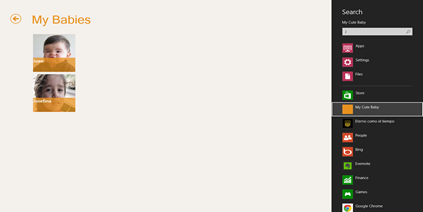
Search

In Genexus, select the object where you want to display your results by setting the property “Search Result Object”. This object must have a grid with an attribute set as ‘Search’. That attribute will be the one your app will query for.

Share Charm

The share charm allows you share something from you app with someone else. Depending on the sharing apps you have, and the content you’re trying to share, some apps will appear as sharing target. Some of those apps will allow you to twit, send over email, send to skydrive, or maybe publish to your facebook wall.

Share is not an app wide feature, meaning that you must choose for every panel, that suits sharing of course, the attribute/variable you want to share.

Panels in Genexus have now a Share property where you can set the Attribute or Variable you want to share. Another way of sharing is by calling the Interop.SendMessage function.

Everything else

Of course there are tons of features that work as you would expect. Keep in mind we’re not even in beta yet but if you put a Date attribute the Date picker will be display, or an Enum domain will show you a combo or even the dynamic combos (Country – City) work as expected.

As mentioned before, there are some missing features… maps, notifications, audio, and more.

That’s a wrap!

So as you can see, there are quite a few cool Windows 8 features that your Genexus app can take advantage of. I encourage you to join the Genexus betatester program that will be available in a few weeks, download the Genexus Tilo night builds and give this generator a try. Right now there’s a alpha test program (at www.genexus.com/tilo) that you could apply if you have a project for Windows 8 (right now), if you just want to play around with it you’ll have to wait.

Also, just in case you just arrived earth from outer space, there’s this big (22nd) Genexus International Meeting in Montevideo from Oct 1 to Oct 3. There are a few sessions you might be interested in (if you found this post interesting), but there are tons of sessions, keynotes, labs and activities you’ll find amusing and educational. I’ll be there so come down and say hello and I’ll be happy to show you all this features live! It’s easy to locate me, I’ll be the guy in the suit.

works-on-my-machine] 

As I always say, this is “works on my machine” certified, but this time it’ll be soon ready for your machine :) stay tuned!

* When I reached the km 33 I hit “The Wall”… from that point on it was all will. I knew I had 9 km ahead of me, and by that time that seemed a lot, by I had already ran 33km, so giving up was not in my plans.

Read Full Post

Friday, August 06, 2010

Annoy Smarx from Windows Phone 7

Annoy Smarx is a web app that Steve Marx showed in Windows Azure Firestarter event. It is a web app that once you clicked on an image, Steve’s notebook wallpaper would change to the selected image. It was a pretty cool demo cause it showed you a good practical sample of AppFabric ServiceBus.

Last week I started playing around with the new Windows Phone 7 SDK, and I faced the problem I do when I start something new, “what should I code”? I t has to be simple cause I’m new to this stuff (I’m no too familiar with silverlight either) but not too simple… I hate the “Hello World!” sample. So I thought maybe I can create a client for the AnnoySmarx sample and so I did.

I liked it cause it a simple project, yet it has many cool features, like downloading blobs from Azure Storage, using a ListBox to show the images, handling the double tap event on Windows Phone 7 (there’s no OnDoubleTap event, so it might be a little more complicated than you think), and calling a rest service on ServiceBus which is actually running on my computer.

You’ll find all the resources you need at Steve’s post and the code for this client here.

I recorded a video of the app running on the emulator…

pretty cool uh?!


works-on-my-machine-starburst_3_thumb[1]

Read Full Post

Tuesday, June 22, 2010

HTTP Error 404.17 - Not Found

The requested content appears to be script and will not be served by the static file handler.

For some (unknown at the time) reason I had this error while trying to view a WCF service app in the web browser. I googled (and binged) around and there was many reasons for that message.

My problem was that my brand new computer came with Microsoft .net 3.0 installed but IIS was not active. So I installed IIS after the WCF support so the WCF mime types were not installed.

To get this working all I had to do is running the following command:

C:\Windows\Microsoft.NET\Framework\v3.0\Windows Communication Foundation\ServiceModelReg -i

Hope it helps someone else.

Read Full Post

Monday, April 19, 2010

My Run 2.0 samples

annoysgomez Last week Run 2.0 took place in Montevideo and I had the privilege of working with Guadalupe Casuso (from Microsoft) and Luis Pandolfi (from Infocorp) on part of the Keynote, we talked about Windows Azure and if you ask me it was too short.

After the keynote I talked to some people who told me the session was great, but most of them already knew about Azure, so I guess I never know how good/clear was for someone new to the Windows Azure Platform (if you’re in this category please send me a line). One thing Guadalupe told us, and I guess she was right, is that there’s no point of showing something you can’t use yet… it’s like showing a kid a candy. I don’t know, but one thing I do know is that we could have use the entire conference to talk about Azure :)

On my part of the session I had to show something on ServiceBus so I showed Steve Marx’s AnnoySmarx sample. I changed a few thing from the listener, one thread would never end unless you close the cmd window, and added a few messages for demoing purposes. The sample is pretty cool cause it let you change the wallpaper of my computer by clicking the images from an online web page (in this case hosted on Windows Azure). For my sample I deployed the web app at http://gomezwallpaper.cloudapp.net/ and people from the audience would get online and click on the images while on the main screen you could see the wallpaper of my notebook changing. I was pretty cool and showed how you can get servicebus up & running with a little extra work from what you do to host regular WCF services.

Another tool I used is Windows Azure Storage Explorer which I built myself to browse and manage items from a Storage Account. I recently uploaded the source code to codeplex, the project is here.

Read Full Post

Wednesday, March 24, 2010

Goodbye trim()

I’ve been playing a bit the the RC version of the .net framework 4 and already found a new cool method.

Until now when I wanted to check for a valid string I had to use the following code:

if (string.IsNullOrEmpty(text) || string.IsNullOrEmpty(text.Trim()))
    throw newArgumentNullException("text", "text is not valid");

And I had to do that because a string containing nothing but white spaces was not valid and if you called the Trim() method on a null string you’ll get a NullReferenceException, you know the message… (“Object reference not set to an instance of an object.”)

So, the new cool method I found is a static method from string called IsNullOrWhiteSpace. the name pretty much says it all, except that the real name should be IsNullOrEmptyOrWhiteSpaces ;)

Instead of writing the code shown above, where you could easily forget the second condition, now you can have the same behavior in one single sentence:

if (string.IsNullOrWhiteSpace(text))
    throw newArgumentNullException("text", "text is not valid");

Read Full Post

Wednesday, December 16, 2009

Windows Azure Web Storage Explorer

A few days ago I posted about my first useful Azure application, which is hosted on here http://storageexplorer.cloudapp.net http://azurestorage.azurewebsites.net. Today I just wanted to announce I just uploaded the code to a Google Code project called windowsazurewebstorageexplorer :)
It is a good (I think is good) example of both programming for the Windows Azure platform and programming against the Windows Azure Storage client API.
So feel free to download it and let me know what you think. (Make sure you download the Windows Azure tools for Visual Studio 2008 first)
As usual, this code is certified to apply every “works on my machine” standard :)
works-on-my-machine-starburst_3
Note: Too bad the December 2009 Windows Azure-Related Developer Challenges are for US only :(

Read Full Post

Wednesday, December 09, 2009

Great programming quotes!

I recently read on stackoverflow a ton of great programmers quotes I thought it’d be good to share.

Here are some of my favorites.

“Walking on water and developing software from a specification are easy if both are frozen.”

“Always code as if the guy who ends up maintaining your code will be a violent psychopath who knows where you live.”

“Linux is only free if your time has no value”

“Debuggers don't remove bugs. They only show them in slow motion.”

Read the full list here.

Read Full Post