Showing posts with label dev. Show all posts

Saturday, November 29, 2014

Deploy to Azure button, WOW!

Deploy to Azure Button

Every now and then some technology, technique, product or whatever comes along that makes you open your eyes wide open and drop your jaw.

A few days ago Microsoft released the Deploy to Azure button, you can read the original post here, but TL;DR it’s a button you put in the README.md file of your GitHub repository and it would “automagically” deploy your repository to an Azure Web Site.

At first I thought, cool, but I’m sure there’s something they’re not telling you, like what’s the structure I need to have in my repository? do I also need to add my binaries, will they build my solution and deploy the assemblies?

So today I gave it a try. I do have a repository on GitHub which output also run on an Azure WebSite so I thought this would be the perfect test. The project is Azure Storage Explorer, and if you take a look the structure of the repository looks it is just a solution file (.sln) with two folders that are a web site project and a helper library.

github

So I added the button to my README.md file which in my case that meant adding this line to the file:

[![Deploy to Azure](http://azuredeploy.net/deploybutton.png)](https://azuredeploy.net/?repository=https://github.com/sebagomez/azurestorageexplorer)

And that’s it. After I pushed it to GitHub I clicked on the button and this site called azuredeploy.net showed up telling me that my repository was going to published to an Azure Web Site. It let me pick a few config settings like the name of the web site AND THAT WAS IT!

What happened in between? I don’t know, I guess something cloned my repo, found and .sln file and built the solution and then moved everything (?) to a web site? I don’t know what they did, I’m just glad it worked the way it did. I’m not saying it is rocket science, it’s just that it’s nice when you find such a simple solution for a much complicated task to do manually.

Kudos to whoever thought having that button was a good idea!

p.s: I wish we had something like that in Genexus Server. I guess we could…

Read Full Post

Tuesday, October 30, 2012

The Windows Store apps ecosystem

It’s been pretty exciting lately with all the announcements from Microsoft. Windows 8 finally came out, we saw the Surface tablet and other some really cool devices, and today Windows Phone 8 was announced to hit the stores in a few days.

I’ve been using Windows 8 since the developer preview and of course it takes some time to get used to it, but if you think about it, and you actually DON’T think too hard about it, Windows 7 keyboard shortcuts work as expected on Windows 8. So if you’re a keyboard wiz, you will have no trouble to find your way around.

What I like about all this new wave is the concept of one app in many devices. I don’t have an Xbox (yet) but being able to take a photo with my phone and have sent over my my notebook, tablet or favorite social network, is (for me) a big step forward. I know people with iPhone and Android devices will say “hey, I can do that with my phone already”, I know. I know it’s not rocket science, I’m just saying it’s a time saver to have it now with Windows, the OS my whole family uses… so now my mom won’t be calling me to help her hook the camera with the computer (that’s not a good example since she’s got an iPad, but you get the idea).

What I don’t like for what I’ve seen so far? The Windows Store. I guess Microsoft didn’t think it would grow-up so fast… the Windows Store as we know will NOT scale up. It’s already difficult to find an app. I don’t know what others have done, but it’s almost impossible to find a game I would like with such an awful layout. At this moment the games category has 1033 apps (games) laid out awfully, so unless you’re looking for Angry Birds or Cut the Rope, it’s frustrating to go in there in pursuit of a cool game. I’ve shut the window store app many times without a single download.

Another weird thing is how many apps have the default Visual Studio 2012 templates images. Either from previous preview versions as for the official released version, I’m talking about the little cross in a box or the star. What’s up with that? Why is Microsoft allowing those crappy looking apps into the store?… there’s no way in hell I’ll even pay attention to an app that’s was not paid attention in the first place from its own developers. That not only increases the amount of apps, which in this case is not good, but it also gives the impression of “beta”… and I’m not talking about the apps, I’m talking about the store.

I know what’s going on. There are a bunch of Microsoft developers who saw how others got rich with apps for iOS and/or Android. Nobody thought that could be possible. Even so, five years ago there were 0 (zero) iOS developers, today they say there more than a quarter million. While those “developers” made millions of apps, some Microsoft developers waited for Microsoft to come up with something, and now it did. And I bet those developers thought, “ok, now is my turn. I know this shit, I’ll get a Windows Store app in no time”. Well my friend, you don’t know shit about Windows Store apps. Actually nobody knows, we’re all learning about it, and if you take a look at the official Microsoft made apps, you’ll see they are also learning. So don’t give me that “I know Silverlight and Xaml, I know what I’m doing” cause your app will look like crap if you don’t sit down and read the tons of guidelines out there about Windows Store apps.

I’ve heard a lot lately that the Surface is great; great hardware but no good apps. I can’t believe there’s no facebook app, aren’t you guys friends anymore? and no official twitter app either? I just hope it’s not attempt from Microsoft to “make us” use IE10 instead, like they’re doing with Xbox.

The good news is, we’re making a Windows Store apps generator. I wrote before about it and showed some of the cool features you can take advantage of with our generator. You might be wondering what kind of apps can we build with this generator. Is it final consumer apps or is it enterprise level apps? Yes to both o them. There’s a big showcase of apps we have built with Genexus for iOS and Android, so expect the same apps for Windows 8 soon.

So, is there an app that you wish Windows 8 had but it is not there? Don’t wait for someone else to build something close to what you need. Download Genexus Tilo now, and start creating the next Windows 8 killer app.

Read Full Post

Tuesday, October 02, 2012

Building a code generator, and running a marathon

485778_4347864811580_1796142993_nMany have been told about how writing code resembles to exhaust training. The long hours, the dedication, the exclusion of what others think of fun, and specially how others can’t understand what you do or why you do it. (assuming you also code for fun)

In the latest months I’ve been doing both of them, training for a marathon and writing the Genexus “Tilo” Windows 8 generator… but unlike the Win8 generator, I can say I finished the marathon (in one piece).

Of course I can’t say the generator is finished, the guys from Android and iOS have been working on them for over a year now so there’s a ton of work to be done. But just like while running the marathon(*), I’m not going to think about what’s missing but what we have achieved instead.

In Genexus we care about letting you model your solution, your needs, and don’t worry about what platform you’re targeting. We call it “platform-independent” or “platform-agnostic” but what I think is most important is our “non platform-ignorant” philosophy. And what does that mean for our Win8 generator? That you as a customer will want your app to use all the “cool features”  Windows 8 has as you would if you develop the app from scratch (meaning writing all the code yourself). So the cool thing is we already wrote all that code so it’s dead simple for you to use. Here I’ll show you what we have and what you need to do in order to have it running on your next Genexus Win8 app.

Lives Tiles

tiles

Lives Tiles is probably the first feature that will call your attention. This feature allows the “icon” (tile) of you app to show different info about your app. A news app for instances shows the latest news, a weather app shows the current conditions and so forth.

With Genexus all you need is a DataProvider that exposes the data you want to show in your tiles. That DataProvider must populate a known structure (SDT) so the app “knows” what to use for the image and what to use for the description. You have to keep in mind that only the latest 5 tiles will be displayed so you might want to limit that on the server side, on the dataprovider itself.

Genexus will provide the SDT (called ‘TileSDT’) and an example of the DataProvider, so all you need to do is modify the DataProvider to populate the SDT as you wish. Remember the [Count = 5] so you don’t send unused data to your app.

Full Device Integration

This was something simple to implement but it is very useful for apps. If you declare an attribute as an Image and you want your users to edit it they will want to use all the features they already have on the device. So that picture could be a file from the local hard drive, or a photo taken with the device’s camera or use any of the images that image providers apps provide. For instance, Windows 8 comes with a Photos apps that connects with your facebook account, flickr, skydrive and other computers, so you can choose an image from your facebook wall album to upload into your app. Cool uh? 

This comes “out of the box”.

Semantic Zoom

SemanticZoom

Semantic zoom lets you see a grid with a bigger picture view. So let’s say you’re showing contacts in your app and you have a grid where every item is of course a contact. You might want to reach to someone you know his name starts with an ‘S’ (like me). So you can scroll all the way to the S and then try to find me, or you can ‘pinch’ the grid and you will see a different view of the same grid, now grouped by the first name letter, doing it easier to go straight to the ‘S’ letter.

With Genexus you already have the “break by” feature of a grid, and you can now define different layouts for the same grid. So with that info you can have semantic zoom in your app.

Heterogeneous layouts

You probably had seen this but didn’t know the name of it. Heterogeneous layouts is the feature that allows you to see specific items of a grid with a different layout.

In Genexus you can define different layouts for your grids and pick on runtime the one you one for a specific pattern. Let’s say you want the item of the grid to be a big 2x2 square, or you want every 5 item to show one as a 2x1 ‘column’. Trust me, it sounds hardar than it is.

Search Charm

Charms is another cool feature of Windows 8. With the search charm you can search your apps, files, settings or in the context of an app. So you can search for ‘Angry Birds’ in the context of the Windows Store (which is an app) of course.

Windows 8 Genexus generated apps comply the search contract so once you call it swiping your finger from the right, your app will be there as a search provider.
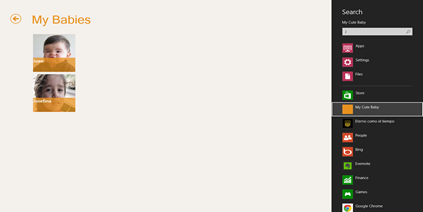
Search

In Genexus, select the object where you want to display your results by setting the property “Search Result Object”. This object must have a grid with an attribute set as ‘Search’. That attribute will be the one your app will query for.

Share Charm

The share charm allows you share something from you app with someone else. Depending on the sharing apps you have, and the content you’re trying to share, some apps will appear as sharing target. Some of those apps will allow you to twit, send over email, send to skydrive, or maybe publish to your facebook wall.

Share is not an app wide feature, meaning that you must choose for every panel, that suits sharing of course, the attribute/variable you want to share.

Panels in Genexus have now a Share property where you can set the Attribute or Variable you want to share. Another way of sharing is by calling the Interop.SendMessage function.

Everything else

Of course there are tons of features that work as you would expect. Keep in mind we’re not even in beta yet but if you put a Date attribute the Date picker will be display, or an Enum domain will show you a combo or even the dynamic combos (Country – City) work as expected.

As mentioned before, there are some missing features… maps, notifications, audio, and more.

That’s a wrap!

So as you can see, there are quite a few cool Windows 8 features that your Genexus app can take advantage of. I encourage you to join the Genexus betatester program that will be available in a few weeks, download the Genexus Tilo night builds and give this generator a try. Right now there’s a alpha test program (at www.genexus.com/tilo) that you could apply if you have a project for Windows 8 (right now), if you just want to play around with it you’ll have to wait.

Also, just in case you just arrived earth from outer space, there’s this big (22nd) Genexus International Meeting in Montevideo from Oct 1 to Oct 3. There are a few sessions you might be interested in (if you found this post interesting), but there are tons of sessions, keynotes, labs and activities you’ll find amusing and educational. I’ll be there so come down and say hello and I’ll be happy to show you all this features live! It’s easy to locate me, I’ll be the guy in the suit.

works-on-my-machine] 

As I always say, this is “works on my machine” certified, but this time it’ll be soon ready for your machine :) stay tuned!

* When I reached the km 33 I hit “The Wall”… from that point on it was all will. I knew I had 9 km ahead of me, and by that time that seemed a lot, by I had already ran 33km, so giving up was not in my plans.

Read Full Post

Monday, October 24, 2011

Featuring GXpowerCommands

apgetwikiimageAfter @gmilano’s Cool Commands for Visual Studio I thought I should write my own “cool commands” for Genexus. There a few tasks the I need to do quite often and I thought I’d be great if I could have right there on a contextual menu, like completely deleting a folder and it’s content or “Rebuild and run” an object… or even run (execute) an object as is, no further specification of analysis needed.

So I created this package with the extensions I found useful to myself. Here’s a little description of every command:

Empty and delete folder: I tries to delete every object in a folder and the folder itself. The success will depend on the references the contained objects have to. I any object A outside the selected folder) is referencing an object B from the folder, B won’t be able to be deleted, thus, the folder either. This command is not transactional.
Build/Rebuild folder objects: Ever wanted to build every object in a folder? It’s kind of painful to select every single object, right? Now you can step on a folder and choose to build or rebuild every single object in it.
Rebuild and run: Only valid for main objects, this command will execute a forced build (rebuild) and then execute (run) the generated program.
Run as is: What was that message again? I know the state of the generated program, I just want to execute it, no validation needed. This is the command that will fire the browser and show you the program “as is”. 
Command prompt here: This is a command that’s now built-in in Visual Studio. Applied to Genexus you can open a command prompt at the Knowledge Base directory or at your different environments directories. Just click on the desired node from the Preferences tree and voilá.
Windows Explorer here: Same as command prompt but for Windows Explorer. Enough said.

This package can be freely downloaded from the Genexus Marketplace, so go ahead and give it a try.

In this post I’ll like to answer the question I know some people must be wondering: “dude! you work at the Genexus Development Team, why aren’t these commands available in Genexus out of the box?”. Well, I’m no traditional Genexus developer so I’m not sure if these commands will actually be useful to the entire community so I don’t want to add “noise” to the already pretty big menus we have in Genexus. So depending on the adoption of these commands you might see some of them in Genexus in the near future.

Spanish instructions here, download here.

Like every other set of bits from this blog, this extension is “Works on my machine” certified, but this one has actually been tested by the guys at the Genexus marketplace Smile
works-on-my-machine-starburst_3_thumb[1]

EDIT 25-Oct-2011: Genexus X Evolution 2 support is now available.

Read Full Post

Tuesday, June 22, 2010

HTTP Error 404.17 - Not Found

The requested content appears to be script and will not be served by the static file handler.

For some (unknown at the time) reason I had this error while trying to view a WCF service app in the web browser. I googled (and binged) around and there was many reasons for that message.

My problem was that my brand new computer came with Microsoft .net 3.0 installed but IIS was not active. So I installed IIS after the WCF support so the WCF mime types were not installed.

To get this working all I had to do is running the following command:

C:\Windows\Microsoft.NET\Framework\v3.0\Windows Communication Foundation\ServiceModelReg -i

Hope it helps someone else.

Read Full Post

Monday, May 17, 2010

Encoding strings for the twitter API

gentleface.com free icon set Some time ago, I started to work on shelltwit a command line twitter updater (it only updates your status), but I didn’t want to use any existing library because I wanted to learn how to work directly to twitter API.

I looked around for some examples, the Twitter API doc is not well updated or complete, so it is not easy to start coding right away, you need to read a lot first (I hate when that happens). I found a good sample from Shannon Whitley called Twitter xAuth with .net. I started up with that code but I found an issue with international characters, like á, é or ñ, which kept me from posting about #Peñarol. So I started to hunt the bug, looked around online, went to the Twitter API user group and found out that there are a lot of issues with international characters. I found people form Brazil, Russia and Japan complaining about it. Apparently most libraries were written by english speaking developers so very few encounter the issue.

Now I can happily say that found the issue so I thought about posting the solution here.

Encoded strings (your twitter status) must be made to UTF8 according to RFC3986 and there’s no native .net function that does that, so after some researching I came up with an algorithm that does exactly that. So I hope it helps some one else.

static string UNRESERVED_CHARS = "abcdefghijklmnopqrstuvwxyzABCDEFGHIJKLMNOPQRSTUVWXYZ0123456789-_.~";

//http://en.wikipedia.org/wiki/Percent-encoding
//http://www.w3schools.com/tags/ref_urlencode.asp see 'Try It Yourself' to see if this function is encoding well
//This should be encoded according to RFC3986 http://tools.ietf.org/html/rfc3986
//I could not find any native .net function to achieve this
/// <summary>
///
Encodes a string according to RFC 3986
/// </summary>
/// <param name="value">
string to encode</param>
/// <returns></returns>
public static string EncodeString(string value)
{
StringBuilder sb = new StringBuilder();
foreach (char c in value)
{
if (UNRESERVED_CHARS.IndexOf(c) != -1)
sb.Append(c);
else
{
byte[] encoded = Encoding.UTF8.GetBytes(new char[] { c });
for (int i = 0; i < encoded.Length; i++)
{
sb.Append('%');
sb.Append(encoded[i].ToString("X2"));
}
}
}
return sb.ToString();
}

Read Full Post

Monday, April 19, 2010

My Run 2.0 samples

annoysgomez Last week Run 2.0 took place in Montevideo and I had the privilege of working with Guadalupe Casuso (from Microsoft) and Luis Pandolfi (from Infocorp) on part of the Keynote, we talked about Windows Azure and if you ask me it was too short.

After the keynote I talked to some people who told me the session was great, but most of them already knew about Azure, so I guess I never know how good/clear was for someone new to the Windows Azure Platform (if you’re in this category please send me a line). One thing Guadalupe told us, and I guess she was right, is that there’s no point of showing something you can’t use yet… it’s like showing a kid a candy. I don’t know, but one thing I do know is that we could have use the entire conference to talk about Azure :)

On my part of the session I had to show something on ServiceBus so I showed Steve Marx’s AnnoySmarx sample. I changed a few thing from the listener, one thread would never end unless you close the cmd window, and added a few messages for demoing purposes. The sample is pretty cool cause it let you change the wallpaper of my computer by clicking the images from an online web page (in this case hosted on Windows Azure). For my sample I deployed the web app at http://gomezwallpaper.cloudapp.net/ and people from the audience would get online and click on the images while on the main screen you could see the wallpaper of my notebook changing. I was pretty cool and showed how you can get servicebus up & running with a little extra work from what you do to host regular WCF services.

Another tool I used is Windows Azure Storage Explorer which I built myself to browse and manage items from a Storage Account. I recently uploaded the source code to codeplex, the project is here.

Read Full Post

Wednesday, March 24, 2010

Goodbye trim()

I’ve been playing a bit the the RC version of the .net framework 4 and already found a new cool method.

Until now when I wanted to check for a valid string I had to use the following code:

if (string.IsNullOrEmpty(text) || string.IsNullOrEmpty(text.Trim()))
    throw newArgumentNullException("text", "text is not valid");

And I had to do that because a string containing nothing but white spaces was not valid and if you called the Trim() method on a null string you’ll get a NullReferenceException, you know the message… (“Object reference not set to an instance of an object.”)

So, the new cool method I found is a static method from string called IsNullOrWhiteSpace. the name pretty much says it all, except that the real name should be IsNullOrEmptyOrWhiteSpaces ;)

Instead of writing the code shown above, where you could easily forget the second condition, now you can have the same behavior in one single sentence:

if (string.IsNullOrWhiteSpace(text))
    throw newArgumentNullException("text", "text is not valid");

Read Full Post

Tuesday, March 09, 2010

New features to the Azure Web Storage Explorer

storageexplorer
On the first version you could only manage blobs, upload, delete and download them. Now I added the same functionality for Queues and Tables.
I found a pretty cool way of showing unstructured data from the Azure tables from a gridview control. How? with my good old friends the DataSets :)
I also updated the source code so you can download the source files from the version that it’s right now running on the Azure platform.
Go to http://storageexplorer.cloudapp.net/ to see the application running and here to download the source code.
Feedback is always welcome!

Edit: url is now http://azurestorage.azurewebsites.net

Read Full Post

Monday, January 25, 2010

YATC (yet another twitter client)

image My twitter followers have probably realize by now that I’ve been playing around with the Twitter API. I’ve been trying out the API and I created a command line tool to update my twitter status.
I tried lots of clients but it is still a pain in the a*s to go to a different application or web browser to update my status.
I have a command line window open all the time so now I’ll be easier to update my status. In case you want to give it a try you can download it from here. The use is real simple, just type twit <your status> and that’s it. If it is the first time you run it it’ll ask you for your twitter credentials.

Edit: as of today (Jan 28th, 2010) twit has bit.ly integration. Just type your status with a url and twit will post the bit.ly short version of it. Yes! I like playing with web APIs.
As always, this bits have the “works on my machine” warranty :)
works-on-my-machine-starburst_3

Read Full Post

Wednesday, December 16, 2009

Windows Azure Web Storage Explorer

A few days ago I posted about my first useful Azure application, which is hosted on here http://storageexplorer.cloudapp.net http://azurestorage.azurewebsites.net. Today I just wanted to announce I just uploaded the code to a Google Code project called windowsazurewebstorageexplorer :)
It is a good (I think is good) example of both programming for the Windows Azure platform and programming against the Windows Azure Storage client API.
So feel free to download it and let me know what you think. (Make sure you download the Windows Azure tools for Visual Studio 2008 first)
As usual, this code is certified to apply every “works on my machine” standard :)
works-on-my-machine-starburst_3
Note: Too bad the December 2009 Windows Azure-Related Developer Challenges are for US only :(

Read Full Post

Wednesday, December 02, 2009

How to disable assert dialogs while testing (.net)

Why would you want to do that in the first place? Let’s say you have a complex (long) test you want to run in your application, so you decided to start it before going home so it’ll be ready tomorrow morning with the results. What would happen if when get to you computer the next morning you find an assert dialog waiting for you to “Abort”, “Retry” or “Ignore”? Believe me, it is frustrating and irritable!
I had a few “alternative ways” to ignore those asserts (http://twitpic.com/qvecx) but Willy told me the correct way to do it.
All you have to do is adding the following to your .exe.config file:

<system.diagnostics>
    <assert assertuienabled="false"/>
</system.diagnostics>


That code tells the framework that you don’t want to show a message box when a “Debug.Assert” is called, which is exactly what I wanted.


So, since my test is a msbuild script all I had to do is adding the above “code” in the msbuild.exe.config and now my tests runs smooth and the results are ready, waiting for me :)


More info on the assert tag here.

Read Full Post

Thursday, January 15, 2009

Writing data to the cloud (SQL Data Services)

In a previous post I talked about setting up the environment for SQL Data Services. Now I’ll show you something I’ve done with it and hopefully it will help somebody thru.

I’ll use my Goomez project cause that’s like my sand box and also, and since it’s available online, you could download it and also play with it. I used the SQL Data Service to store and query the information, so instead of using Lucene.net I used SDS for this implementation, which I believe it’s a good scenario for SDS. That said, the changes you’ll see here were not committed to the svn repository.

But let’s get down to business. SDS has two interfaces, one is through web services, which implies importing the wsdl like any other web service which, if you do it with Visual Studio, it will create all the necessary proxy classes. The other way is REST and since I hadn’t tried anything with it before I thought it’d be a good idea to give that a try too (I must say it’s not a recommended practice, since if you crewed up, it’d be harder to know where).

One thing that I found missing is a good old REST API for .net. I don’t know if this is planed to stay like this, but it’s pretty crapy. You have to create a HttpWebRequest, HttpWebResponse and so forth… not something I enjoy doing. It was fun though (just for this time).

So, here’s the code of the function that actually saves the info of one of the indexed files (FileInfo) to the cloud.

Firts of all, create the request and response objects and set a few properties to the request

HttpWebRequest request = (HttpWebRequest)WebRequest.Create(m_url);
HttpWebResponse response = null;
MemoryStream stm = null;

request.Credentials = new NetworkCredential("<YourSolution>", "<Password>");
request.Method = "POST";
request.ContentType = "application/x-ssds+xml";


In my example, m_url has the value https://goomez.data.database.windows.net/v1/goomezindex because goomez is the authority I created and goomezindex is the container. So now, the entities.


StringBuilder builder = new StringBuilder("<File xmlns:xsi=\"http://www.w3.org/2001/XMLSchema-instance\" xmlns:x=\"http://www.w3.org/2001/XMLSchema\" xmlns:s=\"http://schemas.microsoft.com/sitka/2008/03/\">");
builder.AppendFormat("<s:Id>{0}</s:Id>", Guid.NewGuid());
builder.AppendFormat("<file xsi:type=\"x:string\">{0}</file>", file.Name);
builder.AppendFormat("<folder xsi:type=\"x:string\">{0}</folder>", file.Directory.FullName);
builder.AppendFormat("<extension xsi:type=\"x:string\">{0}</extension>", file.Extension.Replace(".", string.Empty));
builder.AppendFormat("<size xsi:type=\"x:decimal\">{0}</size>", file.Length.ToString());
builder.AppendFormat("<content xsi:type=\"x:string\">{0}</content>", GoomezSearchHelper.Tokenizer.TokenizeToIndex(file.FullName));
builder.Append("</File>");


Here I’m writing the xml which represents an entity, in my case, called File. The file variable you see here is the FileInfo I passed as a parameter to this function.


Now the ‘magic’:


XElement entity = XElement.Parse(builder.ToString(), LoadOptions.SetLineInfo);

stm = new MemoryStream();
entity.Save(stm);
request.ContentLength = stm.Length;
using (Stream stream2 = request.GetRequestStream())
{
stream2.Write(stm.GetBuffer(), 0, (int)stm.Length);
}

response = (HttpWebResponse)request.GetResponse();
if (response.StatusCode != HttpStatusCode.Created)
{
throw new WebException(string.Format(CultureInfo.InvariantCulture, "Unexpected status code returned: {0}", new object[] { response.StatusCode }));
}


Create the entity element, save it at a MemoryStream and get the response.


So, what was that? what did that do? if you go to the SDS Explorer and query the index you’ll see the file you just ‘uploaded’.


SDS Explorer

Read Full Post

Thursday, September 11, 2008

Easy Remover also goes open source

 EasyRemover[3]

Following Milano’s BuildConsole my “Easy Remover” is also going open source, as I did before with Goomez. Now in a Google Code hosted project since I wanted to try it out. I think I’ll move Goomez there too.

For those of you who don’t know Easy Remover and don’t understand spanish (the original post was in spanish), Easy Remover is my alternative to the “Add/Remove Programs” feature in Windows. I always thought the loading was way too slow, had some missing features, and found no use for some of the info displayed there, like the size of the program and how often I use it, I already know that thank you.

Easy Remover loads much faster than the standard/official feature, and lets you search in your installed programs refining the showed programs to the word (or pieces of it) you are looking for.

In the original post, Gusbro posted a link to a blog where it was explained how Windows collects the info to show in the standard form, which explains why it is so slow to load. (here’s the link)

But as mentioned before, I just wanted to let everyone know that Easy Remover goes now open source. Here’s the project site http://code.google.com/p/easyremover/.

One more thing… I posted the project as GNU Public cause they don’t have the “Works on My Machine” license ;)
works-on-my-machine-starburst_3

Read Full Post