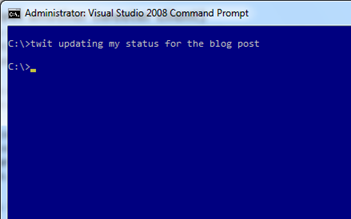
 My twitter followers have probably realize by now that I’ve been playing around with the Twitter API. I’ve been trying out the API and I created a command line tool to update my twitter status.
I tried lots of clients but it is still a pain in the a*s to go to a different application or web browser to update my status.
I have a command line window open all the time so now I’ll be easier to update my status. In case you want to give it a try you can download it from here. The use is real simple, just type twit <your status> and that’s it. If it is the first time you run it it’ll ask you for your twitter credentials.
Edit: as of today (Jan 28th, 2010) twit has bit.ly integration. Just type your status with a url and twit will post the bit.ly short version of it. Yes! I like playing with web APIs.
As always, this bits have the “works on my machine” warranty :)

Read Full Post
Summary only...
We’ve been having a few issues with some users that cannot authenticate to Genexus Server. Logging the server side, thanks to SvcConfigEditor, I found that the probles had nothing to do with the user credentials themselves but with some WCF configuration that prevent packages “from the future” to reach the server.
How did that happen, and most important, how do I change it? It happened because of daylight saving (global warming is everywhere). WCF has a under the hood feature that prevents your server to be reached by packages with a timestamp away 5 minutes (default value) from the server’s time (taken to UTC). Apparently, not everybody has its computer set up correctly with the correct date/time setting, so when one of them changed (the client or the server) the server would not validate the client.
So, how do you change that with your existante basicHttpBinding? you can’t! :( What you have to do is creating a customBinding and modify the maxClockSkew attribute of the security tag. And how do you do that? Well, lucky us there’s a tool that does that for us. It’s called WcfBindingBox (hopefully will stay there for a while) and you simply paste your current binding configuration and when you click ‘Convert to CustomBinding!’ well… it does just that!
After using that new config on my dev server I had the following error while authenticating:
“A supporting token that satisfies parameters 'System.ServiceModel.Security.Tokens.UserNameSecurityTokenParameters:
InclusionMode: AlwaysToRecipient
ReferenceStyle: Internal
RequireDerivedKeys: False' and attachment mode 'SignedEncrypted' was not provided.”
And the problem was exactly what the message says (unbelievable). All I did to fix it was creating an instance of the UserNameSecurityTokenParameters class, configure the properties mentioned on the message and add it to my TransportSecurityBindingElement.
I lost a whole with this so I hope it will be useful to someone else.
Read Full Post
Summary only...
A few days ago I posted about my first useful Azure application, which is hosted on here http://storageexplorer.cloudapp.net http://azurestorage.azurewebsites.net. Today I just wanted to announce I just uploaded the code to a Google Code project called windowsazurewebstorageexplorer :)
It is a good (I think is good) example of both programming for the Windows Azure platform and programming against the Windows Azure Storage client API.
So feel free to download it and let me know what you think. (Make sure you download the Windows Azure tools for Visual Studio 2008 first)
As usual, this code is certified to apply every “works on my machine” standard :)

Note: Too bad the December 2009 Windows Azure-Related Developer Challenges are for US only :(
Read Full Post
Summary only...
I recently read on stackoverflow a ton of great programmers quotes I thought it’d be good to share.
Here are some of my favorites.
“Walking on water and developing software from a specification are easy if both are frozen.”
“Always code as if the guy who ends up maintaining your code will be a violent psychopath who knows where you live.”
“Linux is only free if your time has no value”
“Debuggers don't remove bugs. They only show them in slow motion.”
Read the full list here.
Read Full Post
Summary only...
Why would you want to do that in the first place? Let’s say you have a complex (long) test you want to run in your application, so you decided to start it before going home so it’ll be ready tomorrow morning with the results. What would happen if when get to you computer the next morning you find an assert dialog waiting for you to “Abort”, “Retry” or “Ignore”? Believe me, it is frustrating and irritable!
I had a few “alternative ways” to ignore those asserts (http://twitpic.com/qvecx) but Willy told me the correct way to do it.
All you have to do is adding the following to your .exe.config file:
<system.diagnostics>
    <assert assertuienabled="false"/>
</system.diagnostics>
That code tells the framework that you don’t want to show a message box when a “
Debug.Assert” is called, which is exactly what I wanted.
So, since my test is a msbuild script all I had to do is adding the above “code” in the msbuild.exe.config and now my tests runs smooth and the results are ready, waiting for me :)
More info on the assert tag
here.
Read Full Post
Summary only...


 Posts
Posts


