Beautiful day outside to go to the beach, but I'm recovering from the flu, so I stayed in and thought give some of the "new" VB9 (aka VB 2008) features a try. I must say I got into the .net world thru VB.Net but for one of my projects I decided to switch to C# (also to learn it) and never looked back.
But today I found some amazing new features in VB9 and I wanted to share them. Actually one of them is plain LinQ and we covered that before but I want to comment on VB9's integrated support for XML, and probably the best way to explain it is by showing an example... take a look at the following sub
Dim orders As New OrdersCollection
 orders.Fill()

 Dim elems = From order As Orders In orders Where order.ShipCountry = "Brazil" _
             Select <order><id><%= order.OrderID %></id><customer><%= order.CustomersCompanyName %></customer></order>

Dim doc = <?xml version="1.0" encoding="UTF-8"?><orders></orders>
doc.Root.Add(elems)

Console.WriteLine(doc.ToString())
Keep in mind that OrdersCollection is the collection generated by DeKlarit's BusinessObject Addin. Do you have any idea what this writes to the console? well... take a look at it...
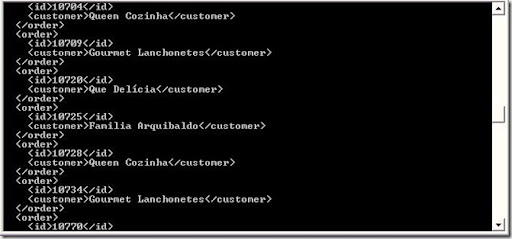
First of all, have you ever seen xml displayed like that in the console? not me. And in case you missed it, let me go thru the code. First, I created the collection and filled it. Then I used LinQ to query the orders shipped to Brazil and selected <order> XElements with an id tag and a customer tag, both of them filled with data. Then I created an XDocument just writing the tags, and then just added my previous collection of XElements (elems) to the document and voilá!, to ToString method of the XDocument prints out what you see in the console pic. Ain't that cool or what?!
Others things you can do with your XDocument (doc)
Console.WriteLine(doc...<order>.Count())
 Console.WriteLine(doc...<order>(0)...<customer>(0).Value)
The first line writes how many orders are in the xml document, while the second line writes the value of the (first) customer of the the first order.
Read Full Post
Summary only...
...and so is DeKlarit 4.5
We have just released DeKlarit 4.5 for 2005 and 4.5 for 2008.
Both versions share the same functionality, but this is our last version supporting VS2005, so start your migration right away. I know I said before that you should create a blank VS2008 project with DeKlarit and import your existing objects to it. Now all that changed, I mean, you can still do it that way, but now I believe the best way is to just open your existing project with VS2008. You will have to add the addins back again.
Remember different VS versions of DeKlarit can coexist. Which means 4.5 for VS2008 can be installed in the same box where 4.5 for VS2005 or 4.3 is. But to install 4.5 for VS2005 you have to uninstall 4.3
There are some cool new features like a suggest combo in foreign keys in the WebGeneratorInfragistics Addin, full WCF support, extension capabilities for the generated application menu, and many more.
Give it a try!, and let us know what you think.
Read Full Post
Summary only...
I recently showed how to use LinQ to query the BusinessFramework's DataSets. Now using the same model (good old Northwind) I'll show you (in case you haven't figured it out yet) how to query the business objects's collections created by DeKlarit's BusinessObjects Addin.
So let's say you have your orders and you want to get all of them:
           OrdersCollection orders = new OrdersCollection();
            orders.Fill();
And now you want to "query" around for say orders shipped to Brazil (love the beaches), so you'll have to write your linQ query as follows:
            var query = from Orders o in orders
                        where o.ShipCountry == "Brazil"
                        select o;
And then just printout whatever you want from the orders:
            foreach (var order in query)
                Console.WriteLine(string.Format("Shipped on {0} to {1} @ {2},{3}",order.ShippedDate, order.CustomersCompanyName, order.ShipCity,order.ShipCountry ));
Easy uh?
Read Full Post
Summary only...
I recently read an article on Visual Studio Magazine from Roger Jennings where he discussed performance using LinQ to SQL.
One of the key "benefits" of using LinQ to SQL with the Entity Framework is the lazy loading. Lazy loading implies that when you are querying Orders you'll get just the orders and in case you want to go thru the Order lines only then LinQ will execute the query against your DB to get the lines.
There are pros and cons against the "old" schema where you used a DataAdapter with the query to fill a DataSet.
One of the pros I see is that the query to get the orders will probably execute faster since it's only going to one table (or two if you want the customer name), thus you'll get to see the orders header faster. But, what happens when you want to see the order lines? well, you have again, to wait for the db to execute "your" query and send in the results. And what if you want to see the Customer address? again another query to the db which Roger refers as to round trips to the database.
In his article Roger discusses a few tips to tweak those round trips and get the best performance out of LinQ SQL, but there's a table in his article which I'm posting here, where you can see not only the time difference between every method of retrieving data, but also the amount of queries LinQ SQL fires to the database in order to get the data. Also, for comparison purposes, he shows typed DataSets which are the fastest and one with the least amount of queries of all.
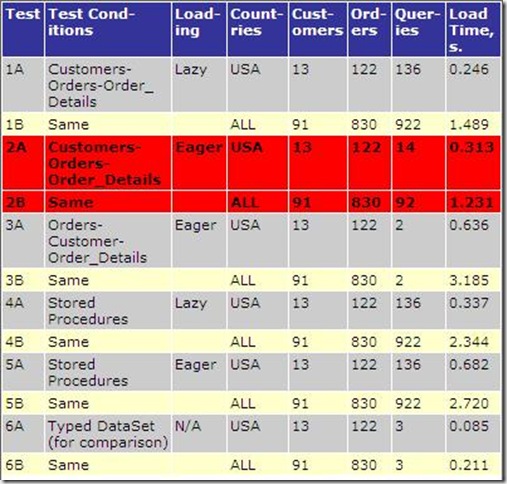
(The red rows were painted by Roger himself to show the best approach)
So... what to choose and when? The answer is simple... Get DeKlarit ;)
DeKlarit uses DataAdapters and DataSets so you don't have to write the SQL queries. Also, DeKlarit knows what you want to get in advance, how? because you told him so while defining the Date Providers.
So, as I see it, you have three ways of getting your data:
1) You use LinQ SQL with entity framework for compile time syntax checking and stuff and loose performance
2) Write your own queries to fill datastes taking care of the connection and everything else gaining performance but doing a lot of the hard work yourself, or
3) Get DeKlarit and just focus in the UI which as far as the client goes, that's what makes your app appealing
I thought it was going to be a tech post but it ended up in a marketing kind of way :)
Read Roger's full article here
Read Full Post
Summary only...
This is going to be just a short post about how to use DeKlarit's business framework with LinQ.
For this sample I used the well-known Northwind database. So it's pretty simple: create your DeKlarit model, rebuild the project so the business framework gets created and add a new project to the solution. In my case it's just a simple Console application which it's Main method has the following code:
OrdersDataAdapter adapter = new OrdersDataAdapter();
OrdersDataSet ds = new OrdersDataSet();
adapter.Fill(ds);
var orders = from OrdersDataSet.OrdersRow order in ds.Orders
where order.ShipCountry == "USA"
select order;
foreach (var order in orders)
Console.WriteLine(string.Format("{0}: {1}-{2}",order.CustomerID, order.ShipCity, order.ShipCountry));
Keep in mind that OrdersDataAdapter and OrdersDataSet are the ones from the business framework so you'll need to add a reference to it and add the correct using statement.
And that's it...
Read Full Post
Summary only...


 Posts
Posts


